Riverside Bakery
Fresh bread every morning from 7am. Order a cake for the weekend and pick it up on Saturday, or see this week's menu.
Open Tuesday to Sunday, 7am to 3pm.
EZ Accessibility
WordPress plugin by Greyteck
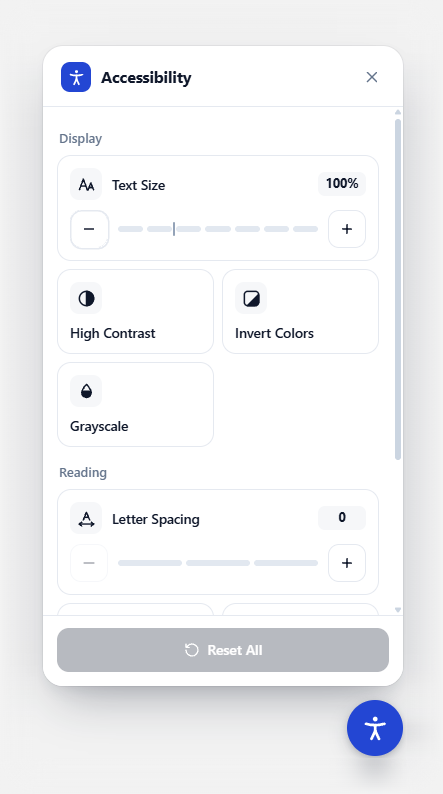
EZ Accessibility adds a small button to your site. Visitors open it to make the page easier to read: bigger text, higher contrast, a clearer font, less motion. Their choices are remembered on their next visit, and it costs nothing.
EZ Accessibility, the free WordPress accessibility plugin, on a real page. It adds one small button to your site. Visitors open it to make your pages easier to read: larger text, high contrast, a more readable font, highlighted links or no animations. Their choices are remembered the next time they visit.
It is built for real sites, not demos. It works with any theme and with page builders like Elementor, it loads no outside scripts, and it is completely free.
These buttons work the way the plugin's panel does on a real site.
Fresh bread every morning from 7am. Order a cake for the weekend and pick it up on Saturday, or see this week's menu.
Open Tuesday to Sunday, 7am to 3pm.
Brand colour
7.3 : 1 Good contrast
Button
Bottom right · Medium, 56px
Visibility
Languages
Scales text up or down in steps, including text sized by page builders like Elementor.
White text on black, with yellow links that are easy to spot.
Flip or remove colour to cut visual noise, while photos and video stay natural.
Outlines and underlines every link on the page.
Switch to a highly legible typeface and add up to three levels of spacing.
Stop motion on the page and make the pointer bigger and easier to follow.
Every control works from the keyboard, with labels and announcements for screen readers.
Picks the right language from your page automatically, and you can add any other language yourself.
Arabic, Hebrew and other right-to-left languages are fully supported; the button and panel mirror on their own.
The panel fits any screen width and respects reduce motion and high contrast settings.
See every change in the settings page before you save.
Pick from presets or set your own, with an automatic contrast check.
Five built-in icons or your own image, in any corner, at any size.
On the whole site or only on the pages you choose, with each tool on or off.
One small script and two small stylesheets, with no libraries and no outside requests.
The panel is drawn inside a Shadow DOM, so your theme's styles can never break it.
Visitor choices are saved only in their own browser. Nothing is sent to any server.
Open, close, reset or refresh the panel from your theme with a small JavaScript API.
It began as the accessibility plugin we built for Qudra's trilingual website, then grew into a plugin for any WordPress site.
See the Qudra projectGet the plugin free from GitHub. A one-click WordPress.org listing is on the way.
In WordPress, go to Plugins, then Add New, then Upload Plugin, and activate it.
Open EZ Accessibility in the admin sidebar to choose your colours, position and tools.
An accessibility toolbar helps visitors read your site the way they need to, but it does not by itself make a website compliant with WCAG, the ADA or similar laws. Clear content, proper markup and accessible design still matter, and we build sites that way.
Yes. The whole plugin is free under the GPLv2 licence, with no paid version and no features held back.
No. It loads one small script and two small stylesheets, uses no libraries and makes no requests to other servers.
Yes. Text size reads each element's real size when the page loads and scales it proportionally, so it works with builders that set inline font sizes.
No. A visitor's choices are stored only in their own browser so they are remembered next time. Nothing is sent anywhere.
Yes. It reads your page's language, so it works with WPML, Polylang and TranslatePress, including right-to-left languages.
Not on its own. A toolbar helps visitors adjust the page, but accessible content, markup and design are still needed. We can help with that too.
We also build custom WordPress plugins and websites for businesses in the US and worldwide.
Tell us what you need